Datasets – Version Management
The Datasets page lets you manage versioned snapshots of your annotation data for a project. Access it from the sidebar (Datasets) while a project is open, or navigate to /projects/:projectId/datasets.
Dataset versioning separates live staging data (actively being annotated) from frozen snapshots (locked versions ready for training or export).
Accessing Dataset Versions
- Open the Annotations module and go to Projects.
- Click a project to open the Project Dashboard.
- Click Datasets in the sidebar, or navigate via the project context.
If no project is selected, clicking Datasets in the sidebar prompts you to select a project first.
Page Layout
The page is divided into two main sections:
Left Panel – Version History
A timeline of all dataset versions for the project:
| Version | Description |
|---|---|
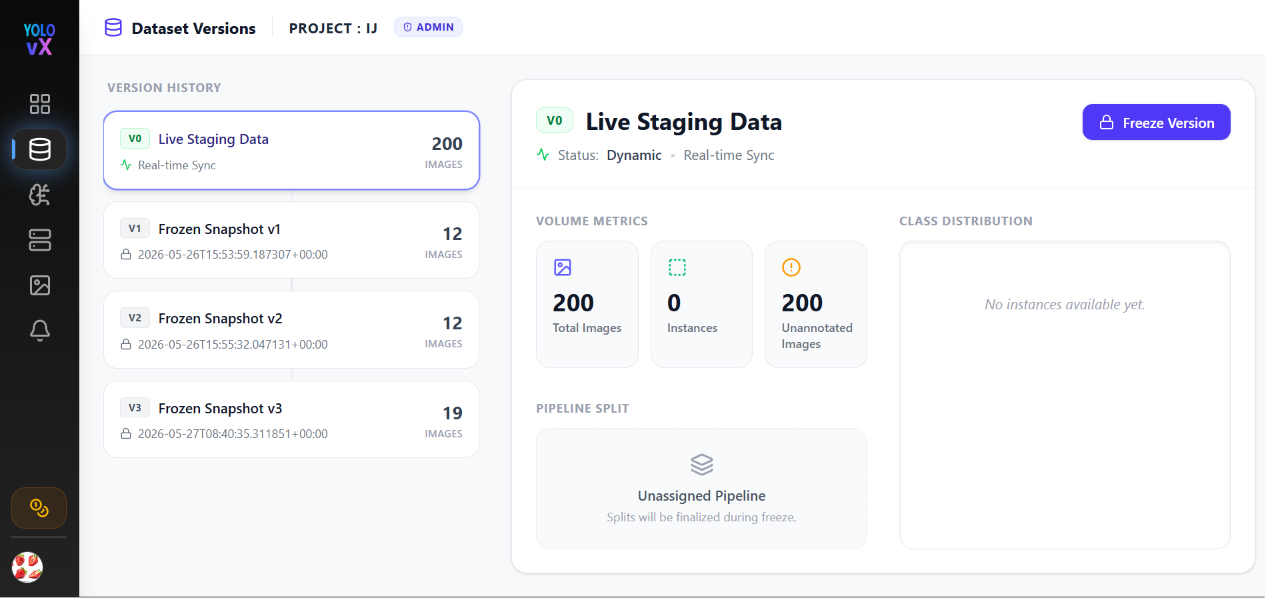
| v0 – Live Staging Data | Real-time sync of current project images and annotations. Status: dynamic (updates as you annotate). |
| v1, v2, … | Frozen snapshots created from the live staging pool. Status: locked (immutable). |
Each version card shows:
- Version tag (e.g.,
v0,v1,v2,v3) - Version name
- Created timestamp (or "Real-time Sync" for
v0) - Total image count
Click any version to view its specific metrics in the right panel.
Live Staging Data (v0)
The v0 version represents your project's current, in-progress dataset:
- Status: Dynamic — counts update in real time as images and annotations are added.
- Volume Metrics:
- Total Images – All images in the current project pool.
- Instances – Total annotation instances across all images.
- Unannotated Images – Images waiting to be annotated.
- Pipeline Split: Displays Unassigned Pipeline (splits are defined when freezing a version).
- Class Distribution: Live bar chart showing instance counts per label ("No instances available yet" when starting fresh).
Freezing a Version
When your staging data is ready, click Freeze Version in the top right corner to convert your live data into a frozen snapshot:
- Click Freeze Version.
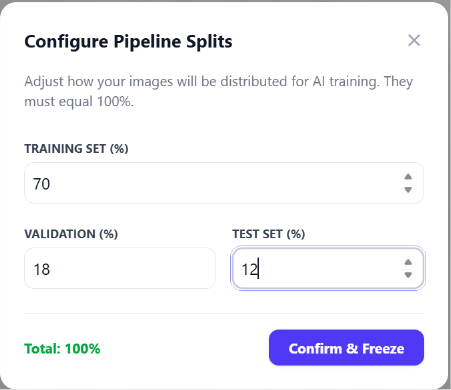
- The Configure Pipeline Splits modal opens.
- Adjust the train, validation, and test percentages (must total 100%):
- Training Set (%) – Default: 70%
- Validation (%) – Default: 20% (or custom, e.g., 18%)
- Test Set (%) – Default: 10% (or custom, e.g., 12%)
- Click Confirm & Freeze.
Frozen Versions (v1+)
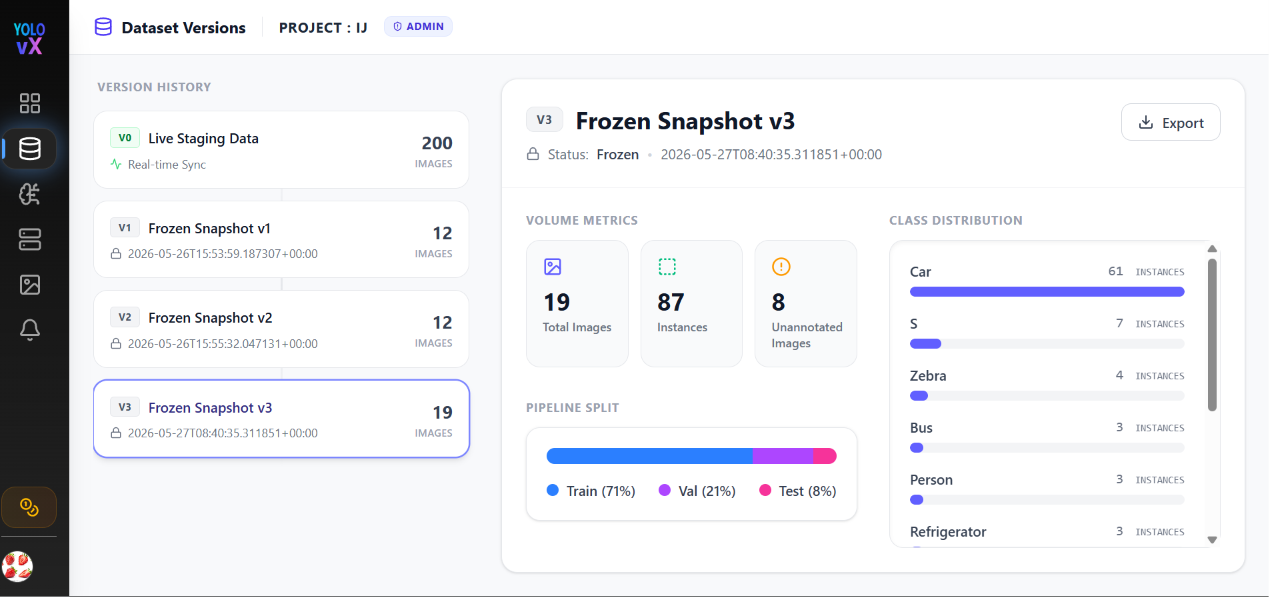
Frozen versions are read-only, immutable snapshots created from v0 staging data.
Volume Metrics
- Total Images – Finalized count of images locked in this version.
- Instances – Total frozen annotation count.
- Unannotated Images – Remaining unlabelled images at the time of freeze.
Pipeline Split
A visual progress bar displaying the configured distribution:
- Train (blue)
- Val (purple)
- Test (pink)
Class Distribution
A scrollable breakdown of all label classes with exact instance counts and visual percentage bars.
Exporting Snapshots
Click the Export button in the top right of any frozen version card to download annotations for training. See Export Formats for supported dataset exports.
Role-Based Access
Your active role badge is displayed in the page header:
| Role | Access Permissions |
|---|---|
| Admin | Full access — freeze versions, export data |
| Member | View version history and volume metrics |
| Annotator | View version history and volume metrics |
Team management and role configurations require a Pro plan. See Upgrade Plan.
Navigation
- PROJECT : [NAME] (uppercase header link) – Returns to the Project Dashboard.
- Dataset Versions title – Indicates current page context.
Workflow Summary
- Annotate: Create job batches and annotate images in your workspace.
- Monitor: Track real-time progress on v0 Live Staging Data.
- Freeze: Click Freeze Version and set your Train/Val/Test percentages.
- Export: Download the frozen snapshot for training or external pipelines.
- Iterate: Continue annotating —
v0updates continuously while frozen snapshots remain locked.